Apple IT Weekly: macOS Privacy Controls Get a Major Overhaul, App Store Compliance Changes, and California Software Taxes Are Coming
Week of November 23, 2026
Some weeks, the biggest Apple IT developments arrive as operating-system releases. Other weeks, the more consequential changes appear quietly in developer documentation, where they are easy to overlook until they start affecting production environments.
This week is firmly in the second category.
Apple has introduced significant changes to Full Disk Access and application-control permissions in macOS 27.3 beta 2. The implications extend well beyond application developers: backup utilities, remote-support tools, automation software, and potentially some management workflows deserve renewed compatibility testing.
Apple has also reorganized App Store compliance declarations, introduced additional age-rating requirements, and announced tax changes that will affect certain software purchases in California beginning January 1, 2027.
For Apple consultants and MSPs, I think the macOS privacy changes are the most important development. They represent another step in Apple’s effort to reduce broad application privileges, and they could change how we deploy, support, and troubleshoot some of the tools we rely on every day.
macOS 27.3 Changes the Conversation Around Full Disk Access
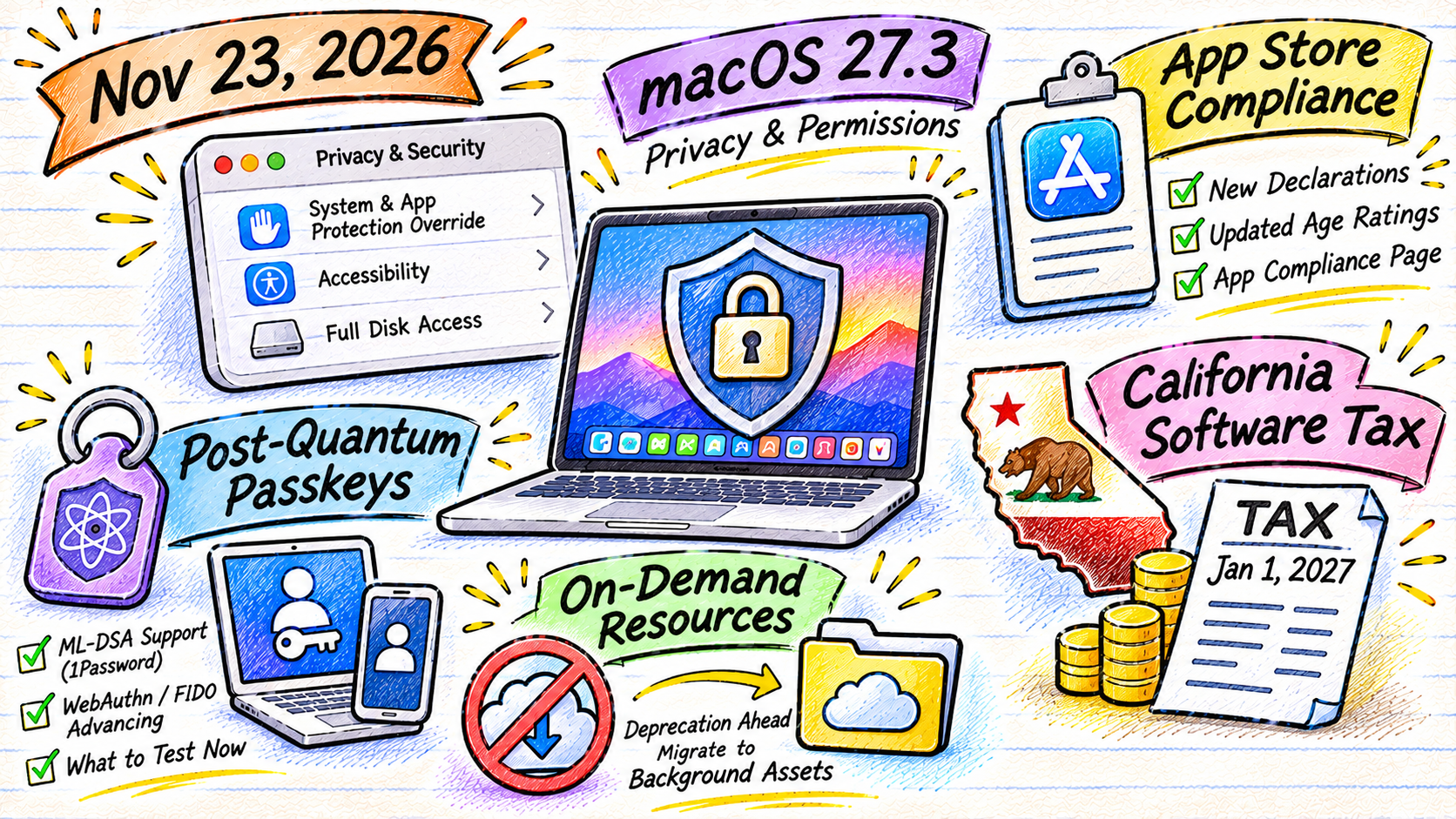
On November 16, Apple announced new privacy controls in macOS 27.3 beta 2 affecting two particularly powerful permission areas: Device Control and Data Access, and Full Disk Access.
Apple is introducing more granular permissions, clearer explanations of what applications can access, and additional visibility when an application controls another application.
The changes include separating the existing Device Control and Data Access setting into two categories: System & App Protection Override and Accessibility.
Apple is also introducing a unified method for selecting applications when granting permissions, options for restricting access to particular applications or folders, and the ability for users to require permission each time access is requested.
A new transparency indicator will appear when an application controls another application through System & App Protection Override. Apple Developer
This is a substantial change in direction, even if its immediate effects are limited to new permission requests.
Why this matters to consultants
Full Disk Access has become one of those permissions that administrators frequently grant because a product requires it, sometimes without revisiting precisely why.
Backup applications need access to protected files. Security software may require extensive visibility into system activity. Automation tools sometimes depend on controlling other applications or accessing locations normally protected by macOS.
The problem is that broad permissions create broad consequences.
An application with unrestricted access may be able to read far more information than its core functionality requires.
Apple’s changes attempt to make that distinction more visible and give users greater control.
I see this as an extension of the same security philosophy that brought us Transparency, Consent, and Control (TCC), system extensions, and increasingly explicit user authorization for sensitive operations.
The difference is that Apple is now revisiting some of the broadest permissions available to third-party software.
Existing permissions remain in effect
There is an important qualification in Apple’s announcement.
Permissions previously granted by users will remain effective.
Apple also says that known applications currently using Full Disk Access for disk backup, or Accessibility for assistive technologies, will retain their existing experience without requiring a new entitlement.
Developers of those applications can request entitlements to preserve comparable behavior for new installations. Apple has not yet published the complete entitlement details. Apple Developer
That means I would not characterize macOS 27.3 as immediately breaking existing backup or automation software.
The more interesting question is what happens during fresh installations, application migrations, or permission changes.
What I would test
I would begin with a clean macOS 27.3 beta 2 installation and evaluate applications that require extensive system access.
Backup software is an obvious candidate, including tools that need to enumerate or copy protected user data.
Remote-support and automation applications deserve equal attention, particularly those using Accessibility permissions or controlling other applications.
For MSP environments, I would test both manually installed applications and applications deployed through an MDM.
The distinction matters because Apple’s announcement describes changes to user-facing permission requests. It does not establish that every existing PPPC configuration payload or MDM authorization mechanism is being replaced.
I would specifically validate whether a previously working PPPC profile continues to provide the expected authorization, whether the application requests additional user consent, and whether a clean installation behaves differently from an upgraded Mac.
For developers maintaining their own tools, Apple’s guidance is equally important: applications should handle restricted access gracefully rather than assuming that Full Disk Access will always be unrestricted.
A backup application that receives access to selected folders should not silently report that an entire disk has been protected.
That is the kind of failure I would want to catch before recommending the new operating-system release to clients.
Apple’s full announcement is available here: Updates to Device Control and Data Access, and Full Disk Access in macOS.
macOS 27.3 Beta 2 Is Now the Important Testing Target
Apple released the second beta of its 27.3 operating-system updates on November 16, covering macOS, iOS, iPadOS, watchOS, tvOS, and visionOS.
On November 19, Apple also issued revised iOS and iPadOS 27.3 beta 2 builds, identified as build 24C5049f. Apple Developer
For production environments, these are still beta releases. I would not deploy them broadly simply because they contain interesting changes.
However, I would expand the normal beta-testing process to include privacy authorization and application onboarding.
A traditional compatibility test might confirm that an application launches, communicates with its server, and performs its expected functions.
With these privacy changes, I would also want to know what happens when the application is installed for the first time, requests privileged access, or attempts an operation beyond the scope of its authorization.
That testing is particularly relevant for applications distributed through Munki, AutoPkg workflows, Jamf, Intune, Addigy, or Iru/Kandji.
The deployment mechanism may work perfectly while the application’s first-run authorization experience changes.
Apple’s developer release catalog provides the current beta builds.
App Store Connect Has a New Compliance Workflow
Apple made another operational change on November 16, moving regulatory declarations and permits into a dedicated App Compliance page in App Store Connect.
Previously, information such as ICP filings, game licenses, and medical-device declarations was managed under App Information.
The new App Compliance area consolidates regulatory documentation, including declarations for applications containing AI-generated or synthetic content and features requiring security assessment in mainland China. Apple Developer
For consultants managing App Store submissions on behalf of clients, this is mostly a workflow change.
But it is worth updating internal documentation, especially if an organization uses a repeatable release process or has several people responsible for different parts of an application submission.
I would review any release checklists or internal documentation that direct developers to the old App Information location.
There is no benefit in having a release delayed because someone is searching for a declaration that Apple moved to another section.
Age-rating requirements were clarified on November 19
There is also an important update to the age-rating requirements discussed in last week’s article.
Apple’s November 19 release notes confirm the introduction of two new content descriptors: Shared Location and Dating and Relationships.
For Brazil, Apple specifies that declaring Shared Location automatically results in an A16 age rating, while Dating and Relationships results in A18.
Developers must provide the declarations when submitting an application update or changing the age-rating questionnaire, and all applications must have them completed by January 12, 2027. Apple Developer
The deadline has not changed, but the November 19 documentation provides more explicit regional guidance.
For clients maintaining applications that share real-world location or provide relationship-related functionality, I would review the classifications now rather than waiting until the next submission.
These requirements also reinforce why App Store compliance should be treated as an ongoing operational responsibility rather than a one-time step performed when an application first launches.
California Software Tax Changes Arrive January 1
Apple’s November 17 developer announcement contains another change that deserves attention, particularly for consultants and software developers operating in California.
Beginning January 1, 2027, Apple says certain categories of applications will become subject to California sales and use tax.
The affected categories include SaaS, App Store Software, Software Training Material, Dating, and Boosting.
Apple has also introduced a new SaaS attribute for applicable App Store tax categories.
The company says the changes will not affect developers’ proceeds or the displayed pretax prices on the United States storefront, although the total amount charged to customers may increase. Apple Developer
For consultants who sell software, manage paid applications, or help clients distribute subscriptions, this is worth reviewing with the organization’s accounting or tax professionals.
I would not assume that every software purchase outside the App Store is automatically covered by the same treatment. Apple’s announcement concerns its own storefront and tax-handling arrangements.
But for App Store transactions, the implications are immediate enough to warrant preparation.
International price adjustments are also scheduled
Apple also announced price adjustments effective December 3, 2026, for apps and In-App Purchases in Botswana, Colombia, Egypt, Rwanda, and Türkiye, subject to the application’s selected base storefront and pricing configuration.
Auto-renewable subscription prices are excluded from these automatic adjustments, as are storefront prices managed manually. Apple Developer
For clients selling internationally, I would review upcoming changes in App Store Connect rather than assuming existing prices will remain unchanged.
The announcement is available directly from Apple: Tax and price updates for apps, In-App Purchases, and subscriptions.
App Distribution Has Another Deprecation on the Horizon
A development announced November 12, just before last week’s publication, is worth including because of its longer-term implications.
Apple says that beginning in early 2027, App Store Connect will stop accepting uploads containing On-Demand Resources from new applications or applications that have never previously used the feature.
Apple recommends migrating to Background Assets. Apple Developer
This is not an immediate removal of On-Demand Resources from every existing application.
The restriction specifically concerns new applications and applications without prior use of the feature.
For developers planning new applications with substantial downloadable content, I would avoid designing around a technology that Apple is already restricting for future submissions.
Background Assets deserves evaluation now, particularly for applications that distribute large datasets, media, or other resources separately from the initial application download.
This is the kind of architectural change that is much easier to address before an application reaches production.
Post-Quantum Passkeys Remain Worth Testing, but Nothing Requires an Emergency Migration
Last week’s article examined 1Password’s October introduction of ML-DSA passkeys.
There is no reason to repeat that announcement as though it were new this week, but the technology remains relevant to long-term Apple identity planning.
1Password supports creating ML-DSA passkeys when the relying website supports the algorithm. Its implementation begins with version 8.12.44, and creation is not currently supported through its iOS implementation or native macOS autofill extension. 1Password
ML-DSA is a post-quantum digital-signature algorithm standardized by NIST in FIPS 204. The IETF subsequently standardized its COSE and JOSE representations in RFC 9964.
Those standards provide important foundations for WebAuthn adoption, but they do not mean that every Apple passkey provider or enterprise identity platform now supports ML-DSA.
For consultants, I would continue testing passkey creation, authentication, and recovery across Safari, third-party browsers, 1Password, and the identity providers used by clients.
The goal is not to replace existing passkeys prematurely.
It is to understand how authentication systems can evolve without disrupting users or creating unnecessary recovery problems.
The primary technical references remain NIST FIPS 204 and RFC 9964.
Apple Business and Device Management: No New Breaking Change This Week
I also reviewed Apple’s Business release notes and the current developer releases for changes affecting enrollment, managed identities, software updates, and device management.
Apple’s published Business release history still identifies October 22 as its latest substantive entry, covering subscription purchasing through Apps and Books.
I did not find a new documented change this week requiring organizations to redesign Automated Device Enrollment, account-driven enrollment, Managed Apple Accounts, FileVault recovery-key escrow, Bootstrap Token, Secure Token, or Activation Lock workflows. Apple Support
That does not mean these areas should be ignored.
For clients using Declarative Device Management, I would continue validating software-update enforcement and reporting as the 27.3 beta cycle progresses.
For Intune-managed environments, Microsoft’s existing OS-support notices also deserve attention when planning new enrollments, particularly where older macOS or iOS devices remain in service. Those notices are ongoing planning considerations, not newly announced Apple changes this week. Microsoft Learn
I would avoid turning a quiet week in Apple Business into a manufactured management emergency.
The real new work is testing the privacy and permission changes, while continuing to maintain the enrollment and security controls already in production.
The Bottom Line
This week’s most consequential development is Apple’s redesign of privileged application access in macOS 27.3.
The changes are still in beta, and existing permissions remain effective, but the direction is unmistakable: Apple wants users to understand and control exactly how much access an application receives.
For MSPs, that makes backup utilities, automation tools, remote-support applications, and permission-dependent workflows worth testing now.
The second priority is application governance. Apple has moved compliance declarations into a dedicated area, clarified new age-rating requirements, and announced changes to software taxation and pricing that take effect over the next several weeks.
And for developers, the approaching restrictions on On-Demand Resources provide another reason to revisit application architecture before beginning new projects.
What I would be doing this week is straightforward: testing privileged application behavior on macOS 27.3 beta 2, reviewing client App Store compliance and pricing configurations, and keeping production fleets current on the November security releases covered last week.
The broader lesson is familiar. Apple’s platform security changes rarely exist in isolation. They affect how applications are installed, how users grant trust, how management tools operate, and ultimately how reliably we can support the environments our clients depend on.